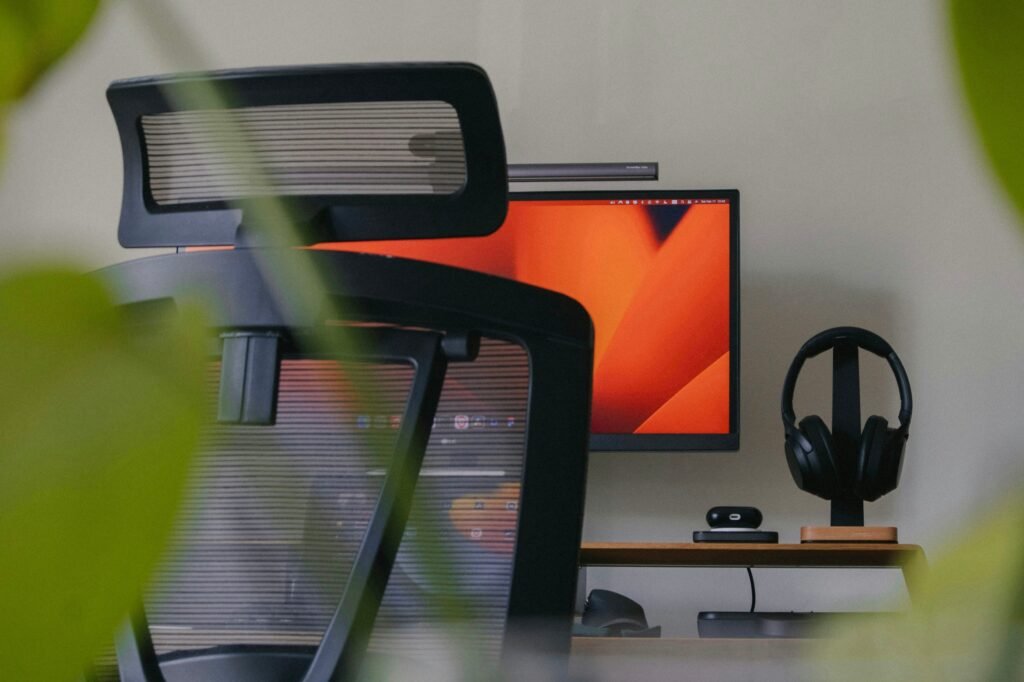
Remote work setup
Introduction to Remote Work
In recent years, the concept of remote work has gained considerable traction, transforming the traditional work environment into something more flexible and accommodating. A remote work setup allows individuals to perform their job duties from various locations outside a conventional office, often their homes or shared coworking spaces. The rise of technology, particularly in communication tools and project management software, has enabled this transition, making it easier for employees and employers alike to adapt to a more remote-based approach.
The benefits of working remotely are manifold. One of the most significant advantages is flexibility; employees can tailor their working hours to suit personal commitments, thereby fostering a healthier work-life balance. This adaptability often leads to increased satisfaction and reduced stress, as individuals can construct their schedules according to their productivity peaks. Moreover, without a daily commute, remote workers save valuable time that can be reallocated towards professional tasks or personal interests.
Additionally, a remote work setup can lead to cost savings for both employees and employers. Workers often save on transportation costs and lunches, while companies can reduce expenses tied to maintaining physical office spaces. However, to fully reap these benefits, it is crucial to establish a productive environment that enhances focus and efficiency. Creating an ideal remote work setup involves careful consideration of various elements such as workspace design, technology requirements, and other factors that contribute to maintaining motivation and productivity.
Ultimately, understanding the nuances of remote work and its associated benefits is fundamental for both individuals and organizations striving to maximize productivity in this evolving landscape.
The Importance of an Ergonomic Workspace
In the context of a remote work setup, establishing an ergonomic workspace holds paramount importance for overall health and productivity. As many professionals transition to remote work, the way they configure their workstation can significantly impact their comfort levels and efficiency. An ergonomic workspace is designed to support the body’s natural posture, thereby reducing the risk of strain or discomfort that can arise from prolonged sitting and repetitive motion.
To begin with, a comfortable chair is essential. Selecting an office chair that provides lumbar support can help maintain the natural curve of the spine. This support is key to preventing back pain, which is a common issue among remote workers. The chair should also be adjustable to accommodate individual preferences, allowing for proper height alignment with the desk. Furthermore, a chair that encourages movement, with features such as swivel and mobility wheels, can also contribute to overall well-being.
Equally important is the height and arrangement of the desk. Ideally, a desk should allow the forearms to be parallel to the floor or slightly inclined while typing. This positioning aids in avoiding unnecessary strain on the wrists. A well-placed monitor is another essential component of the ergonomic workspace. The top of the screen should be at eye level, ensuring that the neck remains in a neutral position while reducing the risk of neck pain.
Moreover, best practices for arranging an ergonomic workspace include maintaining an organized desk, ensuring that frequently used items are within easy reach, and incorporating items such as a document holder to minimize neck strain. Ensuring appropriate lighting can also mitigate eye strain, enhancing focus during long hours of remote work. By investing time and resources into a properly configured workspace, remote workers can create an environment conducive to productivity and long-term health.
Choosing the Right Technology: Laptops and Monitors
In the realm of remote work setup, technology plays a pivotal role in maximizing productivity. One of the most critical components is the laptop. A high-performance laptop not only enhances task efficiency but also ensures a smooth transition between various applications and workloads. When selecting a laptop for remote work, several features should be prioritized. An ideal machine should possess a powerful processor, such as an Intel i5 or AMD Ryzen 5, to handle multiple tasks simultaneously without lag. Additionally, at least 16GB of RAM is recommended to facilitate seamless multitasking, especially when working with resource-intensive software.
Another significant aspect to consider is battery life. A laptop that can sustain several hours of work without needing to be plugged in is essential for those who may need to work from various locations. Lightweight designs are also advantageous for portability, ensuring ease of movement during work hours. Furthermore, display quality is crucial; a full HD (1920 x 1080) resolution screen not only provides sharp visuals but also reduces eye strain during long hours of use.
Alongside a capable laptop, incorporating an extra monitor into a remote work setup can vastly improve productivity. Dual monitors allow users to expand their workspace, making it easier to view multiple applications simultaneously. This setup is particularly beneficial for tasks that involve comparing data or multitasking across different platforms. For instance, professionals can have a video call on one screen while taking notes on another. When choosing a monitor, look for features like adjustable height, blue light filters, and high refresh rates to ensure comfort and efficiency during extended use. Ultimately, investing in the right technology, including a robust laptop and an additional monitor, is crucial for establishing an effective remote work environment.
The Need for Fast and Reliable Internet Connection
In today’s digital age, a stable internet connection is critical for a successful remote work setup. Most professionals rely heavily on online tools and platforms for seamless communication, collaboration, and project management. A minimum speed of 100 Mbps is recommended to ensure that employees can engage in video conferencing, share large files, and utilize various applications without interruptions. This speed accommodates multiple devices and users, which is essential in a household where several individuals may be working or learning online simultaneously.
Moreover, the reliability of your internet connection can significantly impact productivity. Slow or unstable connections may lead to dropped calls during meetings, buffering during video conferences, and a frustrating experience when collaborating on projects. Therefore, ensuring a robust internet connection needs to be a top priority for anyone operating within a remote work setup.
To enhance your home internet connectivity, consider the following tips. First, position your router in a central location to maximize coverage. Placing it away from walls and obstructions can also minimize signal degradation. If feasible, switch to a wired connection, such as an Ethernet cable, which often provides faster and more reliable internet than Wi-Fi.
Additionally, regularly update your router’s firmware and consider upgrading your hardware if it’s outdated. Implementing Quality of Service (QoS) settings in your router can prioritize bandwidth for critical applications, ensuring that video calls and collaborative tools function smoothly. If you continue to experience issues, consider running an internet speed test to diagnose problems and consult with your Internet Service Provider (ISP) for assistance. By taking these steps, you can create a more efficient remote work setup that fosters productivity and collaboration.
Enhancing Communication with Quality Technology
In a remote work setup, communication plays a pivotal role in fostering collaboration and enhancing productivity among team members. With the absence of face-to-face interactions, utilizing quality technology becomes essential to bridge the gap and ensure smooth workflows. Key tools such as video conferencing platforms and high-resolution webcams facilitate effective communication, allowing team members to connect in real-time, share ideas, and engage in meaningful discussions.
A quality webcam not only improves the visual aspect of virtual meetings but also helps to convey non-verbal cues, which are fundamental in understanding context and emotion. When selecting a webcam, factors such as resolution, frame rate, and low-light performance should be taken into consideration. Moreover, pairing the webcam with reliable video conferencing software can significantly enhance the overall communication experience. Tools like Zoom, Microsoft Teams, and Google Meet provide features such as screen sharing, breakout rooms, and chat functionalities, all of which are vital for a productive remote work setup.
In addition to video conferencing, supplementary communication tools like instant messaging apps and project management platforms can further optimize remote collaboration. These applications enable team members to share updates, assign tasks, and keep track of progress without delay. By integrating various tools tailored to the team’s needs, companies can create an efficient communication ecosystem that supports a flexible work environment.
Ultimately, enhancing communication through quality technology is integral to maintaining a cohesive remote work setup. By investing in reliable tools and prioritizing clear communication, organizations not only improve team dynamics but also increase overall productivity, paving the way for successful outcomes in a remote working landscape.
Creating a Noise-Free Environment
In the context of a remote work setup, ensuring a quiet and distraction-free environment is of utmost importance for optimizing productivity. Unlike a traditional office where background noise is often regulated, working from home can lead to various interruptions, making it essential to establish a serene workspace. A peaceful environment contributes significantly to one’s ability to concentrate, thus directly enhancing work performance.
One effective solution to combat noise distractions is the use of noise-canceling headphones. These devices create a barrier against ambient sounds, allowing individuals to maintain better focus on their tasks. Studies have shown that wearing noise-canceling headphones can lead to longer periods of uninterrupted work, decreasing the likelihood of turning attention away from projects at hand. Additionally, they provide clarity during virtual meetings by filtering out background noise, which can often lead to better communication and understanding among team members.
Moreover, these headphones are essential in creating a personal sound environment, enabling users to listen to their preferred background music or white noise. This tailored audio experience can help further drown out household distractions such as conversations, kids playing, or household chores, creating an individual sound capsule that is conducive to focused work. As more professionals adapt to remote work, incorporating noise-canceling headphones into their daily routine can profoundly impact their efficiency and productivity levels, making it a worthwhile investment for anyone seeking to enhance their remote work setup.
Establishing Proper Lighting for Productivity
In a remote work setup, the importance of proper lighting cannot be overstated. Good lighting plays a crucial role in enhancing mood, energy levels, and overall productivity. Natural and artificial lighting have distinctive effects on how one feels during work hours, influencing focus, efficiency, and even emotional well-being.
Natural light is often considered the most beneficial lighting option for a home office. Exposure to sunlight not only lifts one’s mood but also helps in maintaining a regular circadian rhythm. Studies have shown that individuals who work in environments filled with natural light tend to feel more energized, experience fewer headaches, and demonstrate improved concentration. To maximize natural light, position your workspace near windows and keep them unobstructed. Utilizing sheer curtains can help diffuse harsh sunlight while maintaining brightness.
On the other hand, as the day transitions or in situations where natural light is limited, artificial lighting becomes essential. The choice of artificial lighting can significantly impact your productivity. For a remote work setup, it is advisable to use a combination of ambient, task, and accent lighting. Ambient lighting, which provides overall illumination, should be complemented with task lighting—such as desk lamps—that focus directly on the workspace. The color temperature of light bulbs also matters; opt for cool white or daylight bulbs that mimic natural light to enhance alertness.
Furthermore, adjusting the brightness and contrast of your lighting can help reduce eye strain, making it easier to work for longer periods without fatigue. Incorporating dimmers can allow you to customize the lighting based on the time of day and your mood, creating a more flexible workspace.
Organizing Your Workspace: The Role of Cable Hubs and Accessories
Creating a conducive remote work setup is essential for optimizing productivity and efficiency. One of the often-overlooked aspects of a well-organized workspace is the management of cables and accessories. A clutter-free environment can significantly influence your focus and overall work performance.
When multiple devices are connected in a remote work setup, such as computers, monitors, chargers, and printers, they often lead to tangled cords and messy desks. This disorganization can be a distraction, adversely affecting concentration levels. Therefore, investing in cable hubs and organizational tools is not merely an aesthetic choice but a practical necessity. Cable management systems help to streamline the appearance of your workspace, making it visually appealing and enhancing functionality.
A key accessory to consider is a cable hub, which consolidates all your power connections into one accessible location. This not only prevents cables from sprawling across your desk but also allows for easier access when you need to charge or disconnect devices. Additionally, using cable clips or sleeves can further enhance the organization of your workspace, ensuring that cables remain in place and are less prone to wear and tear.
Besides cables, various other accessories can complement your remote work setup. Ergonomic desk organizers, for instance, help keep essential tools within arm’s reach, minimizing time spent searching for items. Additionally, adopting a good filing system for both digital and physical documents can help in maintaining an organized and focused work environment.
In conclusion, a deliberate approach to organizing your workspace, particularly through effective cable management and the use of accessories, can drastically enhance your productivity while working remotely. By reducing clutter and distractions, you pave the way for improved focus and efficiency, making your remote work setup more effective and enjoyable.
Conclusion: Setting Up for Success
In the modern landscape of employment, having an effective remote work setup is crucial for fostering productivity and satisfaction. Throughout this discussion, we have explored several key elements that contribute to creating an ideal workspace conducive to focus and efficiency. Firstly, the importance of a well-defined work area cannot be overstated; it serves as a psychological cue for productivity and should be free from distractions. Setting up a designated space in your home, equipped with the right tools and resources, is vital in distinguishing work time from personal time.
Moreover, ergonomics play a significant role in the remote work scenario. An appropriate chair and desk height can prevent discomfort and physical strain, enhancing the overall remote work experience. Investing in quality office equipment such as monitors, keyboards, and other accessories not only improves comfort but also ensures that your work setup aligns with your work style and preferences.
The digital aspect of remote working also requires attention, as having reliable technology and a good internet connection is imperative for seamless communication. Utilizing productivity tools and software can streamline tasks and collaboration, making your workflow more efficient. Furthermore, establishing boundaries with family or housemates during dedicated work hours is essential to reduce interruptions and maintain focus.
To conclude, assessing your current remote work setup and applying the insights provided can significantly enhance your productivity, comfort, and overall satisfaction with remote work. Taking the time to evaluate and adjust your workspace according to these principles will not only improve your performance but also contribute to a more balanced work-life dynamic. Consider making these changes today to create an environment that works best for you, fostering both personal and professional growth in your remote work journey.

We create powerful, insightful content that fuels the minds of entrepreneurs and business owners, inspiring them to innovate, grow, and succeed.