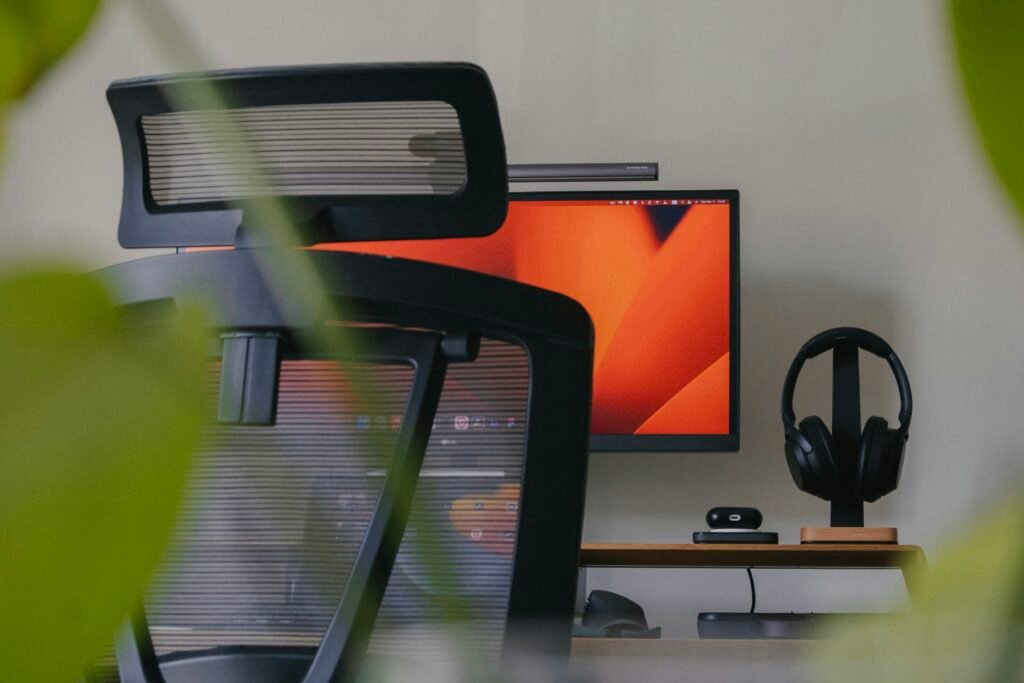
Remote Work Setup
Introduction to Remote Work Setup
The concept of remote work has gained significant traction in recent years, transforming the way individuals and organizations approach their daily tasks. With advancements in technology and shifts in work culture, more employees are adopting flexible work arrangements that allow them to operate outside traditional office environments. This growing prevalence of remote work reflects a broader trend toward flexibility, work-life balance, and the steady integration of digital tools into everyday processes. As a result, creating an effective remote work setup has become essential for maintaining productivity, ensuring comfort, and safeguarding security.
An effective remote work setup involves a range of factors that contribute to an individual’s ability to perform tasks efficiently from home or any chosen location. This includes having a dedicated workspace, reliable technology, and the necessary resources to access company networks safely. Additionally, a well-structured remote work environment aids in diminishing distractions and promoting a more focused approach to work tasks. Without a conducive setup, employees may struggle with motivation and engagement, leading to frustration and reduced output.
Moreover, the importance of physical comfort and mental well-being cannot be overstated. Ergonomic furniture and a well-organized office space can enhance productivity by ensuring individuals are comfortable while working long hours. Simultaneously, taking steps to establish effective communication channels with colleagues fosters team cohesion and maintains a sense of belonging within the workforce, which is crucial in a remote work context. As companies evolve and adapt to the demands of the modern workplace, prioritizing an effective remote work setup stands to benefit both employers and employees alike. This blog post aims to explore these key aspects, offering insights and practical tips for establishing an optimal remote work environment.
The Importance of Ergonomics in Your Workspace
Creating a comfortable and efficient remote work setup is essential for maintaining productivity and overall well-being. A critical element of such a setup is ergonomics, which focuses on designing workspaces that promote optimal comfort and efficiency while minimizing discomfort and risk of injury. Investing time in establishing an ergonomic workspace can transform your home office into an environment conducive to both focus and physical health.
The foundation of any ergonomic workspace typically includes a suitable desk and chair. An ergonomic chair should support the natural curve of your spine and allow for adjustable height to accommodate individual preferences. Ideally, your feet should rest flat on the ground, while your knees remain at a 90-degree angle. A good chair will also provide lumbar support to maintain healthy posture during prolonged sitting hours that often characterize a remote work setup.
Your desk height is another crucial factor; it should allow your workspace to encourage a neutral wrist position while typing. This helps to avoid strain on your wrists and arms. Adjustable desks or those designed for standing can also offer variety, allowing you to shift from sitting to standing throughout the day. Incorporating elements such as a monitor stand ensures that your screen is at eye level, thereby reducing neck strain, and enhancing concentration.
Incorporating ergonomic accessories, such as keyboard trays and footrests, can further enhance your remote work environment. These items promote better positioning and comfort, helping to reduce fatigue and encourage productivity. By intentionally creating an ergonomic workspace, individuals can greatly reduce the risk of common issues associated with prolonged screen time, such as back pain and repetitive strain injuries.
Tech Essentials for Remote Work
To establish an effective remote work setup, integrating the right technological tools is paramount. The foundation of any successful remote operation is high-speed internet, which facilitates seamless communication and the efficient use of cloud-based platforms. Slow internet connections can hinder productivity, resulting in frustrating interruptions during video conferences or while downloading crucial documents. Investing in a reliable internet service provider ensures that connectivity remains stable, allowing professionals to focus on their tasks without unnecessary delays.
Another critical component of a remote work setup is the inclusion of a second monitor. Studies have shown that dual monitors can significantly increase productivity by allowing users to multitask more efficiently. For instance, with one screen dedicated to video conferencing and the other displaying project documents, workers can engage in discussions while actively referencing shared materials. This configuration helps streamline workflows, making transitions between tasks smoother and reducing the time spent switching windows on a single display.
Additionally, quality audio and video equipment cannot be overlooked. Clear communication is essential in a remote environment, and having a reliable headset or microphone ensures that audio issues do not disrupt meetings. Furthermore, high-definition webcams enhance the visual experience during video calls, fostering better engagement among team members. By investing in these technological essentials, remote workers not only improve their individual efficiency but also contribute to a more cohesive team dynamic.
In summary, a robust remote work setup hinges on the integration of high-speed internet, multiple monitors, and superior audio and video equipment. These elements not only support individual productivity but also enhance overall collaboration and communication within remote teams.
Digital Tools for Productivity and Security
As remote work setups become increasingly popular, the importance of incorporating effective digital tools cannot be overstated. These tools not only enhance productivity but also ensure the security of sensitive information, crucial for any organization. In this section, we will explore several essential tools that are integral to a successful remote work environment.
Firstly, Virtual Private Networks (VPNs) are a pivotal component in securing a remote work setup. VPNs encrypt internet traffic, safeguarding sensitive data from potential breaches, especially when accessing public Wi-Fi networks. Utilizing a VPN allows remote workers to maintain privacy and security across their online activities, making it an indispensable tool for businesses that handle confidential information.
In addition to VPNs, cloud storage solutions such as Google Drive, Dropbox, and OneDrive play a significant role in a remote work setup. These platforms enable seamless file sharing and collaboration among team members, regardless of their physical locations. By storing documents in the cloud, employees can access necessary files at any time and from any device, enhancing both productivity and flexibility.
Furthermore, project management software like Trello, Asana, or Monday.com can streamline processes and improve organizational efficiency. Such tools facilitate task assignment, progress tracking, and deadline management, ensuring that team members remain aligned on objectives. By utilizing project management software, organizations can significantly enhance accountability and maintain momentum on projects, critical for sustaining productivity in a remote work environment.
Lastly, incorporating communication tools such as Slack or Microsoft Teams can foster effective collaboration among remote workers. These platforms provide instant messaging, video conferencing, and file sharing capabilities, promoting a cohesive work culture despite the physical distance. By integrating these digital tools into their remote work setups, organizations can enhance both security and productivity, ensuring a successful transition to a flexible working model.
Designing Your Dedicated Workspace
Creating an effective remote work setup begins with the establishment of a dedicated workspace. The significance of having a specifically designated area for work cannot be overstated. By cultivating a separate environment, individuals can reduce distractions and maintain a clear boundary between personal and professional spheres, ultimately resulting in enhanced productivity.
When selecting a location for your workspace, consider areas that are relatively quiet and free from interruptions. Ideally, this space should be designated solely for work activities. If possible, position your workspace in a separate room to ensure a clear demarcation from your home life. For those without an additional room, a specific corner of a room can be adapted to serve this purpose effectively.
Once a suitable location is identified, focus on the design and organization of this area. Begin by investing in furniture that promotes comfort and ergonomics, as these elements are crucial for sustaining long work hours. A well-structured remote work setup includes a proper desk at a suitable height, an ergonomic chair that provides adequate support, and appropriate lighting that minimizes eye strain.
Furthermore, personalizing the workspace can significantly boost motivation. Consider incorporating elements that inspire you, such as artwork, plants, or motivational quotes. However, it is essential to strike a balance between personalization and potential distractions. Keeping your workspace organized and clutter-free will further enhance your efficiency and focus.
In addition to the physical setup, consider implementing technology that supports your work needs. Reliable internet connectivity, suitable software tools, and methods for secure communication are paramount in ensuring a smooth remote working experience.
In summary, a thoughtfully designed workspace can profoundly impact your productivity and well-being while working remotely. By creating a dedicated area that fosters focus and minimizes distractions, remote workers can achieve better work-life balance and enhance their overall performance.
Maximizing Natural Light and Personalization
In a remote work setup, the environment in which one operates plays a crucial role in determining productivity and overall well-being. One of the most impactful elements is natural light. Studies have consistently shown that exposure to natural light can enhance mood, boost energy levels, and increase focus. For individuals working from home, ensuring that their workspace is well-lit with natural light can help create a more vibrant atmosphere. Positioning the desk near a window can facilitate this, allowing sunlight to flood in during the day. This not only makes the space more inviting but also contributes to improved mental clarity and reduces feelings of fatigue.
In addition to maximizing natural light, personalization of one’s remote workspace is equally important. Personal touches can help foster a sense of ownership over the space, making it truly feel like one’s own. This can involve adding items that inspire or represent personal interests, such as artwork, motivational quotes, or even plants that introduce a touch of nature. Personalization serves as a reminder of one’s identity and passions, which can be crucial for motivation. Furthermore, studies suggest that a well-personalized workspace can lead to increased job satisfaction, ultimately enhancing productivity.
Moreover, integrating colors or elements that resonate on a personal level can further enhance comfort. For instance, calming colors such as blues or greens can create a tranquil environment conducive to deep work, while energizing colors such as yellow or orange might boost creativity. As individuals establish their remote work setup, balancing natural light with personal elements can transform a standard workspace into a sanctuary of productivity and comfort. Thus, maximizing these factors is essential for anyone striving for excellence in their remote working experience.
Fostering Work-Life Balance
Establishing a dedicated remote work setup plays a crucial role in maintaining a healthy work-life balance. The design and layout of your workspace can significantly influence your productivity and overall well-being. To begin with, it is essential to delineate physical boundaries between your work and personal life. This could mean designating a specific room or corner of your home solely for work purposes. Such a clear demarcation not only minimizes distractions but also helps signal to your brain that you have entered or exited work mode. Having a separate workspace ensures that when you leave that area, you are effectively “clocking out” for the day.
Additionally, creating routines is critical for reinforcing boundaries in your remote work setup. Establishing regular hours for starting and ending your workday contributes to a structured approach that promotes consistency. Implementing rituals, such as a morning coffee or an evening walk, can serve as mental cues to transition between work and leisure. Consistent routines not only enhance productivity but can also alleviate feelings of isolation that remote workers often experience, fostering a sense of normalcy in the absence of a traditional office environment.
Equally important is the necessity to disconnect after work hours. In a remote work setup, the lines between professional and personal time can often blur, leading to potential burnout. It is imperative to establish a specific cutoff time after which you refrain from work-related tasks or communications, allowing for a genuine mental reset. Engaging in leisure activities, exercising, or spending time with family and friends can effectively replenish your energy, ensuring that you return to work refreshed. Fostering a work-life balance not only enhances individual productivity but enriches overall life satisfaction.
Common Mistakes to Avoid in Remote Work Setup
Setting up an effective remote work environment is a challenging task, and many individuals fall into common pitfalls that can hinder productivity and comfort. One of the most significant mistakes is neglecting ergonomics in the workspace. A proper ergonomic setup plays a crucial role in reducing physical strain. Without an adjustable chair and desk, or without proper screen placement, individuals may find themselves at risk of chronic discomfort or injury. Investing in ergonomic furniture is essential for creating a sustainable remote work setup.
Another frequent oversight is the use of inadequate technology. Many remote workers underestimate the importance of reliable hardware and software. Slow internet connections, outdated computers, or insufficient memory can severely obstruct workflow. Therefore, ensuring that the technological components of the remote work setup are up to par is vital for seamless operations. Upgrading equipment and adopting tools that enhance communication and task management can significantly boost productivity.
Distractions in the home environment also present challenges that can derail focus. Individuals often create their remote work setup in locations where interruptions are frequent, such as living rooms or kitchens. Developing a designated workspace away from common household distractions can foster a more professional atmosphere conducive to concentration. Additionally, defining clear boundaries with family members or roommates about work hours can minimize disturbances.
Lack of organization can further complicate the remote work experience. Cluttered desks, unorganized digital files, and unclear task lists can lead to inefficiency and increased stress. To counteract this, establishing an organized system for both physical and digital spaces is essential. Utilizing tools like to-do lists, calendar applications, and dedicated storage solutions can help streamline workflow and enhance overall effectiveness.
Conclusion and Key Takeaways
Creating an optimal remote work setup is not merely a matter of convenience; it is crucial for enhancing productivity and ensuring a balanced work-life dynamic. The key components to consider encompass ergonomics, technology, digital tools, workspace design, lighting, and maintaining a healthy balance between personal and professional life.
Firstly, ergonomics plays a vital role in ensuring comfort during extended work hours. Investing in an ergonomic chair and desk can prevent physical strain and promote better posture, which is fundamental to long-term health. Moreover, the right equipment, including monitors and keyboards, helps reduce any potential discomfort.
Technology is another cornerstone of an effective remote work setup. Having reliable equipment, such as a high-speed internet connection and powerful computing devices, is essential for seamless productivity. Additionally, utilizing various digital tools can facilitate collaboration and communication with colleagues, simulating the in-office experience.
The design of the workspace itself should not be overlooked. A well-organized and aesthetically pleasing environment can significantly affect motivation and focus. Ensuring adequate lighting, particularly natural light, can enhance mood and productivity levels while also reducing eye strain.
Furthermore, it is important to cultivate a work-life balance. Establishing clear boundaries can aid in preventing burnout, allowing individuals to recharge away from their remote work setup. Reflection on one’s current setup may highlight areas for improvement that can lead to increased efficiency and well-being.
In conclusion, the ideal remote work setup integrates various elements that prioritize comfort, technology, and personal well-being. By assessing and optimizing these aspects, individuals can significantly enhance their remote working experience.

We create powerful, insightful content that fuels the minds of entrepreneurs and business owners, inspiring them to innovate, grow, and succeed.